Homepage ↝ Bt 1 Indiana Form in PDF

Bt 1 Indiana Form in PDF

Fill Out Your Document Online
Article Map

Embarking on the journey of registering a business or updating business information in Indiana involves navigating the Indiana Department of Revenue's (DOR) Form BT-1, Business Tax Application. This critical document serves as a gateway for businesses to align with state tax regulations, necessitating a thorough understanding and preparation of specific information. Among the essentials are the Federal Tax Identification Number (EIN) and Indiana Taxpayer Identification Number (TID), vital for the application's completion. Applicants must also be ready to furnish details including the legal or corporate name, contact information, and the reason for filing the application, which ranges from registering new businesses to adding tax types. Furthermore, the form requires specifics about the business's organization type, state of incorporation, NAICS code, among others, highlighting the importance of preparedness in ensuring a smooth registration process. With tax obligations and business authenticity at stake, a comprehensive approach to filling out Form BT-1 is indispensable for businesses aiming to thrive within Indiana's regulatory landscape.

Sample - Bt 1 Indiana Form

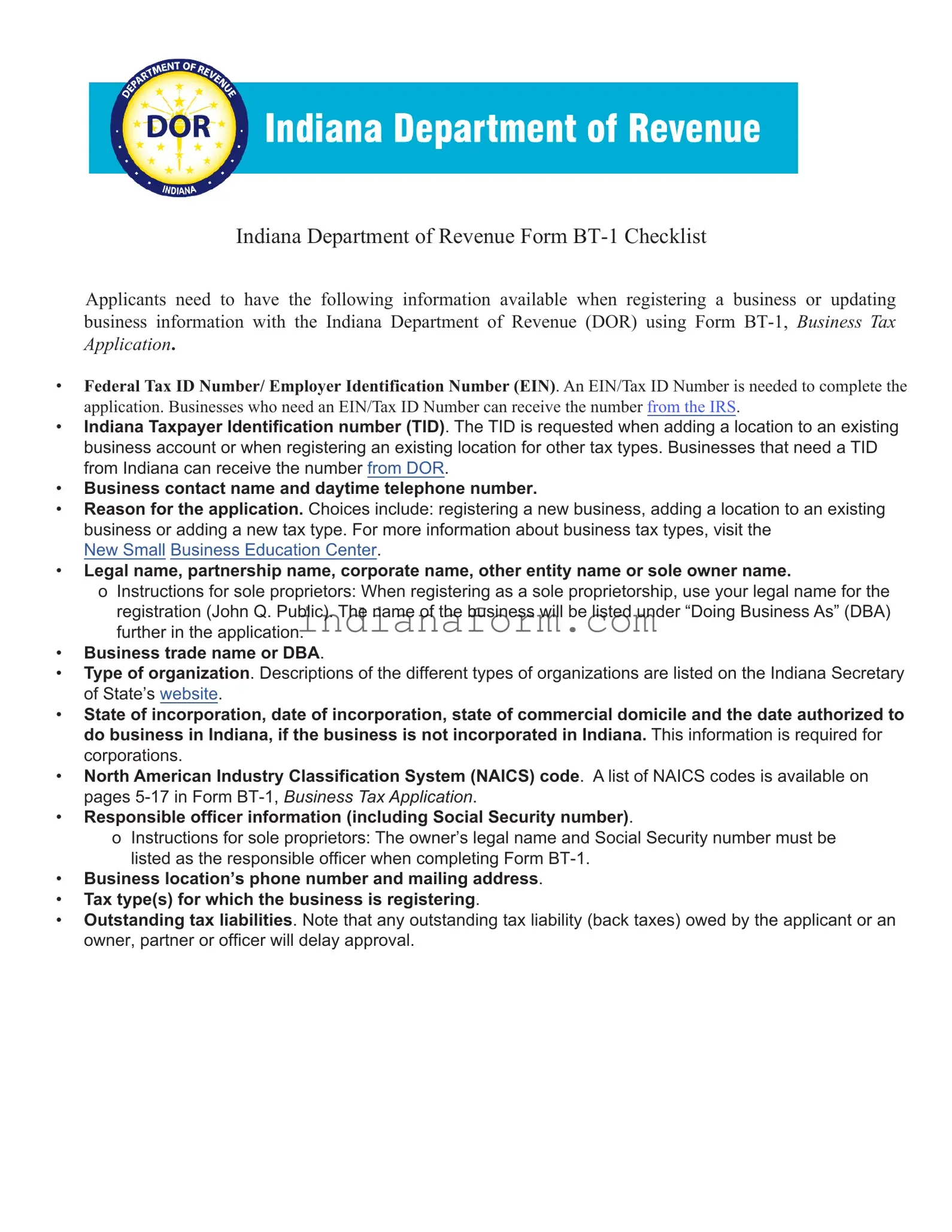
Indiana Department of Revenue Form BT-1 Checklist
Applicants need to have the following information available when registering a business or updating business information
with the Indiana Department of Revenue (DOR) using Form BT-1, Business Tax Application.
• Federal Tax ID Number / Federal Employer Identication Number (FEIN). A FEIN / Tax ID Number is needed to
complete the application. Businesses who need a FEIN / Tax ID Number can receive the number from the IRS.
• Indiana Taxpayer Identication number (TID). The TID is requested when adding a location to an existing business
account or when registering an existing location for other tax types. Businesses that need a TID from Indiana can
receive the number by contacting DOR at www.in.gov/dor/about/contact-us.
• Business contact name and daytime telephone number.
• Reason for the application. Choices include: registering a new business, adding a location to an existing business or
adding a new tax type. For more information about business tax types, visit the New Small Business Education Center
at www.in.gov/dor/i-am-a/business-corp/business-education.
• Legal name, partnership name, corporate name, other entity name or sole owner name.
ο Instructions for sole proprietors: When registering as a sole proprietorship, use your legal name for the registration
(John Q. Public). The name of the business will be listed under “Doing Business As” (DBA) further in the
application.
• Business trade name or DBA.
• Type of organization. Descriptions of the di󰀨erent types of organizations are listed on the Indiana Secretary of State
INBiz website at inbiz.in.gov/business-entity.
• State of incorporation, date of incorporation, state of commercial domicile and the date authorized to do business in
Indiana, if the business is not incorporated in Indiana. This information is required for corporations.
• North American Industry Classication System (NAICS) code. A list of NAICS codes is available here:
www.naics.com/search-naics-codes-by-industry.
• Responsible o󰀩cer information (including Social Security number).
ο Instructions for sole proprietors: The owner’s legal name and Social Security number must be listed as the
responsible o󰀩cer when completing Form BT-1.
• Business location’s phone number and mailing address.
• Tax type(s) for which the business is registering.
• Outstanding tax liabilities. Note that any outstanding tax liability (back taxes) owed by the applicant or an owner,
partner or o󰀩cer will delay approval.
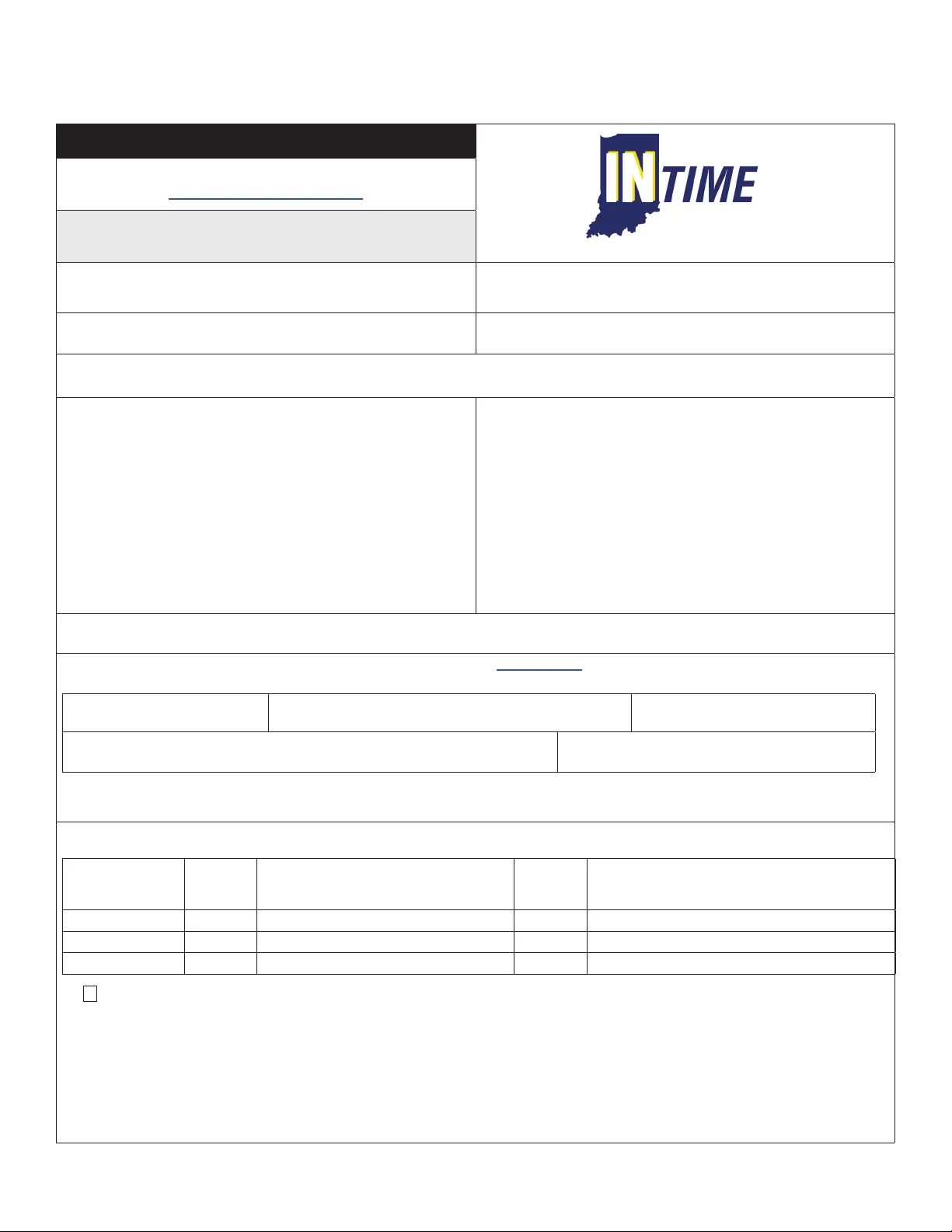
Indiana Department of Revenue
Business Tax Application
A separate application is required for each business location.
To le this application online, visit:
inbiz.in.gov/BOS/Home/Index
Section A: Taxpayer Information (see instructions on page 1)
Please print legibly or type the information on this application.
1. Federal Identication Number (FEIN):
___ ___ -— ___ ___ ___ ___ ___ ___ ___
2. If this business is currently registered with the Department of
Revenue, enter your Taxpayer Identication Number (TID):
___ ___ ___ ___ ___ ___ ___ ___ ___ ___ ___ ___ ___
3. Name of contact person responsible for ling tax forms. (Complete
Section I)
4. Contact person’s daytime telephone number:
A B Ext.
5. Check (only one) reason for ling this application: Starting New Business Business Under New Ownership To Change Type of Organization
To Add Location to Existing Account To Register for Other Type(s) of Tax Other ___________________________________________
6.
Owner name, Legal name, Partnership name,
Corporate name or
Other entity name: Check if foreign address (See instructions)
B _____________________________________________________
If sole owner (last name, rst name, middle initial, Su󰀩x)
C ______________________________________________________
Primary Address: D ________________________________________
City: E _________________________________________________
State: F ______________________ ZIP Code: G _______________
County: H ______________________________________________
Email Address: I _________________________________________
7. Business trade name or DBA and physical location: (This name and
address is for the business location.) Check if foreign address
(See instructions)
Name: B _______________________________________________
P.O. Box numbers cannot be used as a business location address.
Street Address: C ________________________________________
City: D _________________________________________________
State: E ___________________ ZIP Code: F __________________
County: G _________________ Township: H __________________
Business Location
Telephone Number: I ______________________ J Ext. _________
8. Check the type of organization of this business: Sole Proprietor Partnership LLP LP Corporation S Corp
LLC Nonprot Fed Govt Other Govt Other ___________________________________________________________
9. Indiana Secretary of State Control # __________________________ See www.in.gov/sos for requirements.
10. All corporations answer the following questions: Otherwise, proceed to Question 11.
A. State of Incorporation:
B. Date of Incorporation:
Month Day Year
C. State of Commercial Domicile:
D. If not incorporated in Indiana, enter the
date authorized to do business in Indiana. Month Day Year
E. Accounting period
year ending date: Month Day
11. North American Industry Classication System
(NAICS): Please enter a primary and any
secondary code(s) that may apply. PRIMARY
12. Owner, Partners, or O󰀩cers (Attach separate sheet if necessary.) Social Security Numbers are required in accordance with IC 4-1-8-1.
A
Social Security
Number
B
RO Start
Date
C E E F
Last Name, First Name, Middle Initial, Su󰀩x
G
Title
H
Street Address City State ZIP Code
1
2
3
13.
K
Are you a Marketplace Facilitator? (See instructions and complete Line 14 and Section J)
14. Tax(es) to be Registered for this Business Location (Check all that apply.)
A Withholding Tax (Complete Section C.) F Private Employment Agency (See instructions on page 2.)
B County Innkeepers Tax (Complete Section E.) G Tire Fee (Complete Section G.)
C Food and Beverage Tax (Complete Section D.) H Heavy Equipment Rental Excise Tax (Complete Section H.)
D Motor Vehicle Rental Excise Tax (Complete Section F.) I Peer to Peer Vehicle Excise Tax (Complete Section I.)
E Sales Tax (Complete Section B for a Registered Retail Merchant Certicate.)
Form BT-1
State Form 43760
(R24 / 12-25)
Visit INTIME.dor.in.gov for an easier way to le and pay your business taxes online.
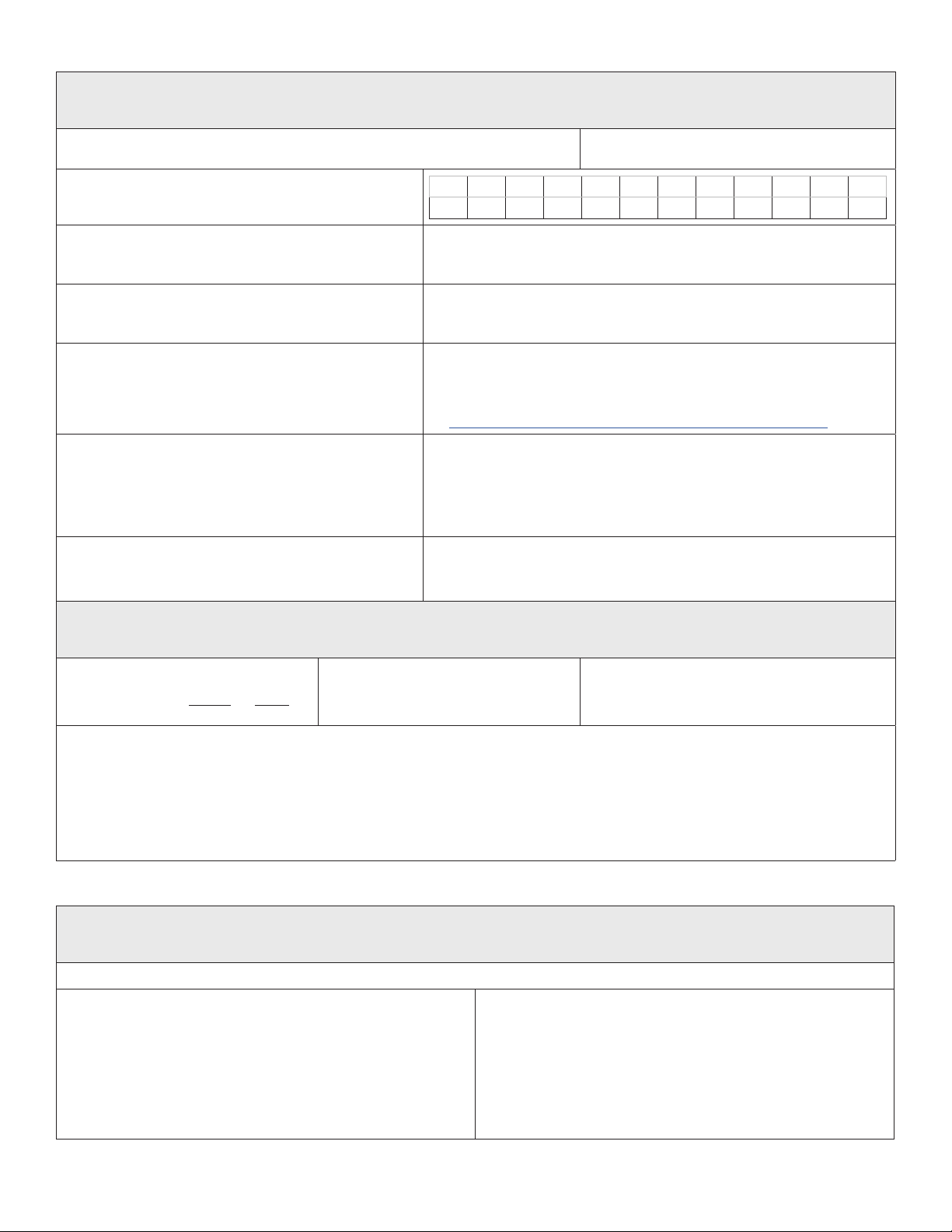
Page 2a (Please print legibly or type the information on this application.) Business Tax Application
Section B: Sales Tax (RST) Tax Registration (Valid for two years, see instructions on page 2)
($25 Nonrefundable Registration Fee for Retail Merchant Certicate)
Contact the Department at (317) 232-2240 for more information regarding these taxes.
1. Registration date of this location under this ownership:*
* See Instructions on page 2. Month Year
8. Estimated monthly taxable sales: $
(Must be $1 or more; see instructions on page 2)
Check the appropriate responses.
2. Is this business seasonal? Yes No
If yes, check active months. (Check no more than nine.)
A B C D E F G H I J K L
Jan Feb Mar Apr May Jun Jul Aug Sep Oct Nov Dec
3. Will you provide lodging or accommodations for periods of
less than 30 days? Yes No
If yes, complete Section E.
9. Do you sell tires? Yes No
If yes, complete Section G.
4. Will prepared foods or beverages be sold/catered?
Yes No
If yes, complete Section D.
10. Will Heavy Equipment be rented for less than 30 days from this location?
Yes No
If yes, complete Section H.
5. Will alcoholic beverages, beer, wine or packaged liquor
be sold from this location? Yes No
If yes, and you have one, enter your ATC Permit Number.
Expiration Date
Month Day Year
11. Are you registered for Streamline Sales Tax? Yes No
If you are registered, enter your Streamline Sales Tax
(SSTID) Number.
If you should need to register (you must le online) go to
www.in.gov/dor/i-am-a/business-corp/sales-tax/streamlined-sales-tax
6. Will cars or trucks (less than 11,000 lbs Gross Vehicle
Weight) be rented for less than 30 days from this location?
Yes No
If yes, complete Section F.
12. If you are reporting sales tax on a consolidated basis, is this
location to be included in your consolidated account?
Yes No
If yes, enter your Reporting Number (TID).
_______________________________ __________
7. Do you occasionally make sales in the State of Indiana at
fairs, ea markets,
etc? Yes No
Section C: Withholding Tax (WTH) Registration (see instructions on page 2)
(No Registration Fee)
Contact the Department at (317) 232-2240 for more information regarding this tax.
1. Accounting Period
Year Ending Date 12 31
Month Day
2. Date taxes rst withheld from an Indiana
resident/employee under this ownership
Month Year
3. Anticipated monthly wages paid to Indiana
resident/employees
$
4. Mailing name and address for WTH tax returns (if di󰀨erent from Section A, Line 6) Check if foreign address (see instructions)
In care of: B_______________________________________ Street Address: C__________________________________________________
City: D_______________________________________________ State: E_________________ ZIP Code: F_____________________
5. Are you a Race Team withholding income taxes for Race Team
Members who are nonresident employees/independent contractors? Yes No
Section D: Food and Beverage (FAB) Tax Registration (see instructions on page 3) (No Additional Fee)
Sales Tax Section B must also be completed.
Contact the Department at (317) 232-2240 for more information regarding this tax.
Complete this section if prepared foods or beverages will be sold.
1. Date of rst sales at this location under this ownership
Month Year
2. Enter the name(s) of the county(ies), city(ies) and/or town(s) where
prepared foods or beverages are sold or catered and list start dates.
A County B City or Town C Starting Date
1.________________ ______________________ ______________
2.________________ ______________________ ______________
3.________________ ______________________ ______________
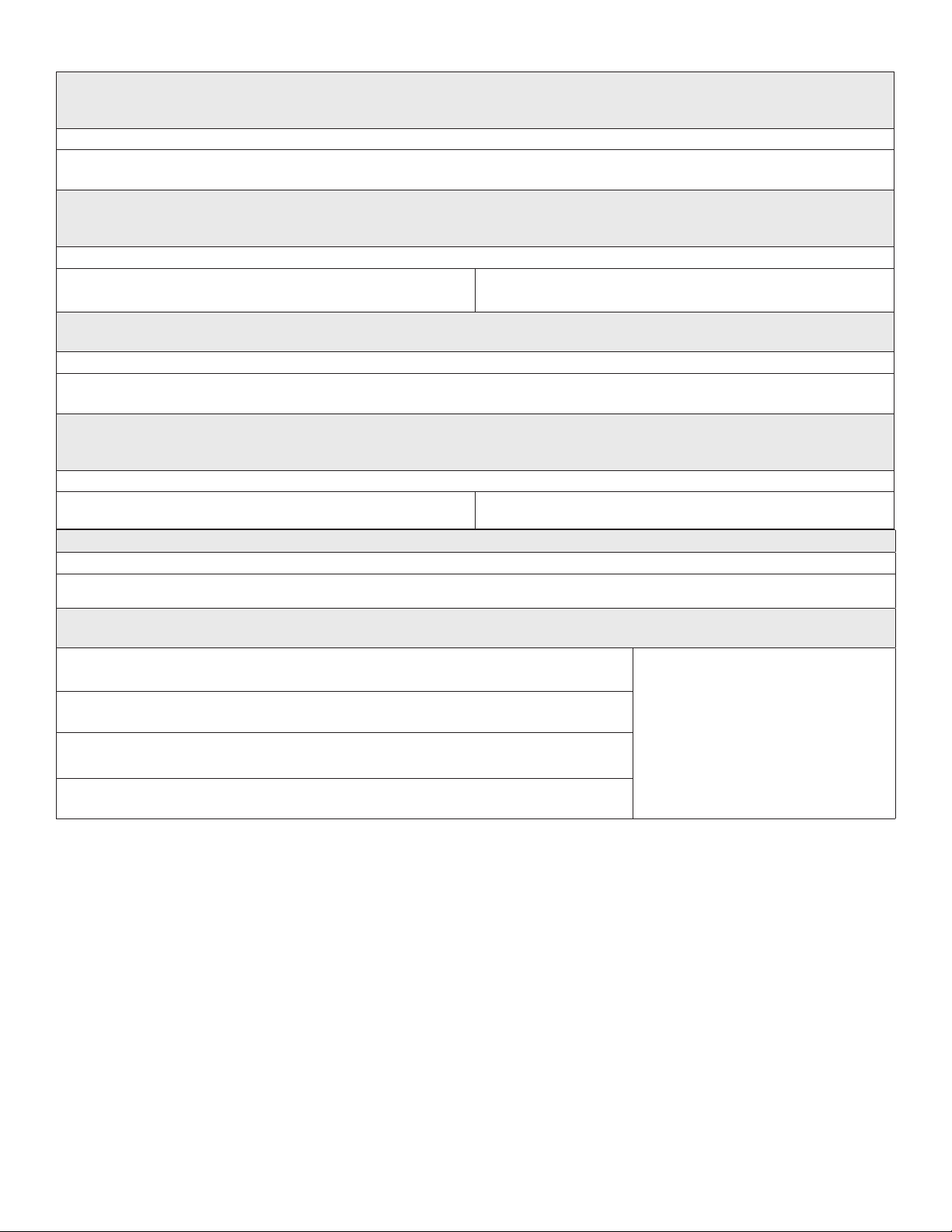
Page 3a (Please print legibly or type the information on this application.) Business Tax Application
Section E: County Innkeepers Tax (CIT) Registration (see instructions on page 3) (No Additional Fee)
Sales Tax Section B must also be completed.
Contact the Department at (317) 232-2240 for more information regarding this tax.
Complete this section if you will provide lodging or accommodations for periods of less than thirty days.
1. Date room rentals or accommodations begin from this location
Month Year
Section F: Motor Vehicle Rental (MVR) Excise Tax Registration (see instructions on page 3) (No Additional Fee)
Sales Tax Section B must also be completed.
Contact the Department at (317) 232-2240 for more information regarding this tax.
If cars or trucks (less than 11,000 lbs Gross Vehicle Weight) will be rented for less than thirty days from this location, complete this section.
1. Date motor vehicle rental or leasing begins
Month Year
2. Tax District Number: _________________________________
If unknown, contact the County Assessors o󰀩ce.
Section G: Tire Fee (TIF) Registration (see instructions on page 3) (No registration fee)
Contact the Department at (317) 232-2240 for more information regarding this fee.
Complete this section if you will be selling new replacement tires and/or new tires mounted on motor vehicles.
1. Date sales begin from this location:
Month Year
Section H: Heavy Equipment Rental Excise Tax Registration (see instructions on page 3) (No Additional Fee)
Sales Tax Section B must also be completed.
Contact the Department at (317) 232-2240 for more information regarding this tax.
If heavy equipment will be rented for less than thirty days from this location, complete this section.
1. Date heavy equipment rental or leasing begins
Month Year
2. Tax District Number: _________________________________
If unknown, contact the County Assessors o󰀩ce.
Section I: Peer to Peer Vehicle Sharing Excise Tax
If vehicle sharing will be for less than thirty days from this location, complete this section.
1. Date vehicle sharing begins
Month Year
Section J: Marketplace Facilitator
See instructions for more details on Marketplace Facilitators.
1. Does this business operate a marketplace on which it facilitates sales to Indiana customers?
If box is checked, ensure section B is complete.
A marketplace is a forum used to
connect sellers to buyers. A business is
a marketplace facilitator if it operates a
marketplace AND collects the payment or
provides access to payment services on
behalf of the seller. These boxes should not
be checked unless the registering business
is operating a marketplace AND facilitating
sales for third parties. A business that is
selling through a marketplace should NOT
check any of these boxes.
2. Does this marketplace facilitate the provision of accommodations to Indiana customers?
If box is checked, ensure section E is complete.
3. Does this marketplace facilitate the sale and delivery of prepared food to Indiana customers?
If box is checked, ensure section D is complete.
4. Does this Marketplace facilitate the sharing of personal vehicles?
If box is checked, ensure section I is complete.
Page 4a (Please print legibly or type the information on this application.) Business Tax Application
Section K: Signature Section
Contact the Department at (317) 232-2240 for more information regarding this application.
I hereby certify that the statements are correct.
Signature: __________________________________________ Title: __________________________ Date: ______________________
This application must be signed by the owner, general partner, corporate o󰀩cer, or resident agent before it will be accepted by the Department. (IC
6-8.1-3-4)
Note:
Failure to remit sales tax due and/or income tax withheld is a felony punishable by imprisonment, a ne of $10,000 plus a 100-percent fraud penalty.
The partners or corporate o󰀩cers are each personally, jointly and severally liable for the sales and use tax* collected and the withholding tax
withheld. These taxes are trust fund taxes and are not discharged in bankruptcy proceedings.
*This includes: County Innkeepers Tax (CIT), Food and Beverage Tax (FAB), Tire Fee (TIF), and Motor Vehicle Rental and County Supplemental
Excise Tax (MVR).
Mail To: Private Employment Agencies Only
Mail To:
Indiana Department of Revenue
Tax Administration Processing
P. O. Box 6197
Indianapolis, IN 46206-6197
Titles and Clearances Division
100 N. Senate Ave
Indianapolis, IN 46204
For additional information about private
employment agencies:
Call (317) 232-5977
Page 1
Instructions for Completing Form BT-1
Please allow four to six weeks for processing.
Purpose: Form BT-1 is an application used when registering with the
Indiana Department of Revenue for Sales Tax, Withholding Tax, Out-of-
State Use Tax, Food and Beverage Tax, County Innkeepers Tax, Tire Fee,
and Motor Vehicle Rental Excise Tax, or a combination of these taxes.
e form also allows you to add a new tax type to an existing registered
location in the event your business activities expand.
• Be sure to answer all applicable questions. Failure to do so may
result in delays in establishing an account for you or may result in
penalty assessments for returns that cannot post to your account.
• Please print legibly or type the information on your application.
• Note: Any outstanding tax liability owed by the applicant or
• an owner, partner, or ocer will delay application approval.
Section A
(is section is devoted to taxpayer information.)
Line 1: According to federal guidelines, most partnerships and all
corporations are required to obtain a Federal Identication Number
(FID). is number is also required whenever you withhold federal
income tax from employees, regardless of ownership type. If you have a
FID, enter it on Line 1. is form may be submitted to the Department
of Revenue prior to receiving your FID. If you have applied, but have not
yet received your federal identication number, indicate “applied for”
on Line 1. You may get this number by completing the Internal Revenue
Service Form SS-4. is form may be obtained from your local IRS oce
or by calling 1-800-829-3676. Your FID is assigned to you by the Internal
Revenue Service.
Line 2: e Taxpayer Identication Number (TID) is applicable only
if you have previously registered with the Department. e TID is a
13-digit number shown on the Registered Retail Merchant Certicate
and/or vouchers or returns.
Lines 3 and 4: Enter the name and the daytime telephone number of a
person within your organization whom the Department may contact
about tax-related matters for this location.
Line 5: Check the reason (only one) that explains why you are ling this
application.
Note: Canadian/foreign address If you indicate it is a foreign address
please complete the address following U.S. Postal guidelines. e City
line should show the Country name written in full and preferably in
capital letters. A Canadian address should be shown the same as a U.S.
address. Use the standard two-character abbreviations for provinces and
territories. It will go on the State line.
Line 6: ese lines are for your ownership name and mailing address.
On the rst line, enter the ownership name of your business. If you are a
sole proprietor, enter your last name, rst name, and middle initial. If you
are a corporation, enter the corporate name as listed on your corporate
charter. If you are a partnership and have a legal partnership name,
enter the name as recognized by the Internal Revenue Service. If you are
a nonprot organization, enter your organization’s name as listed with
the Internal Revenue Service. All government agencies should list their
proper agency name. Enter the address of the ownership. Your email
address is optional.
Line 7: If your business is conducted under a trade name or DBA (doing
business as) name, enter it here. Enter the location street address, city,
state, zip code, county, and township. If you do not know your township,
contact your county assessor. Enter the telephone number of the business
location. If you are conducting business activities from your home, enter
your home telephone number (include the area code).
Note: e business location address cannot be a P.O. Box number.
Line 8: is line is used to indicate the type of organization of
your business. For detailed information about the dierent types of
organizations, go to: www.in.gov/sos/business
Line 9: Enter your Indiana Secretary of State Control number, if you have
one.
Line 10: is information is to be completed only if you are a
corporation. Otherwise, proceed to Question 11.
A) ”State of Incorporation” is the state where your Articles of
Incorporation were led.
B) ”Date of Incorporation” is the date you incorporated.
C) ”State of Commercial Domicile” is the principal place from where
your trade or business is directed or managed. Commercial
domicile is not necessarily in the state of incorporation.
D) ”Enter the date authorized to do business in Indiana.” is date is
obtained from the Indiana Secretary of State’s Oce for any foreign
corporation not incorporated in Indiana seeking authority to
transact business in Indiana.
E) ”Accounting Period Year Ending Date” is the month and day your
corporation closes its books. If you are on a calendar year, your
accounting period date is Dec. 31. If you are on a scal year, the
accounting period date will be a date other than Dec. 31.
Line 11: Enter the North American Industry Classication System (NAICS)
code (available at www.naics.com/search-naics-codes-by-industry) for your
business activity. You may enter up to four codes. e codes will assist the
Department in mailing tax bulletins and other information applicable to
your business. If you are currently using a six-digit code that is not on the
list, but has been approved by the IRS, use that number(s).
Line 12: is section must be completed for processing of this form. If
the business is a Sole Proprietorship, enter the owner’s Social security
number, last name, rst name, middle initial, title as owner and home
address. If the business is a Partnership, enter each general partner’s
Social Security number, name (last name, rst name, middle initial), title
of the partner, and home address. If you are a Corporation, enter the
Social Security numbers, names of the corporate ocers, titles, and home
addresses. If you are a Governmental Agency or other type ownership,
enter Social Security number(s), name(s) of ocial ocer(s), title(s), and
home address(es). Social Security numbers are required in accordance
with IC 4-1-8-1. Aliates of the registering entity listed on Line 6 must
provide the Federal Identication Number, its entity name and address as
well as the names, addresses and Social Security numbers of the aliate’s
responsible ocers or partners. Attach additional sheets if necessary.
Page 2
Tax Registration
Line 13: If the box is checked here you must complete select the tax types
from question 14 you wish to register for and complete section J.
Line 14: Check (all that apply) the type of tax(es) you wish to register for
this business location.
Private Employment Agency Instructions
Complete Section A and the Signature Section of the BT-1.
Contact Licensing at 317-232-5977 for a separate application which will
need to be completed and submitted with your BT-1. See Signature
Section for mailing address.
Section B
Retail Sales Tax Account: $25 Nonrefundable Registration Fee
Retail Sales Tax is applicable whenever selling activities are conducted
in Indiana; whenever a business location, warehouse, distribution center
exists; or whenever employees solicit or take orders for your products
in Indiana (this includes wholesalers). Upon registration for retail sales
tax, the Department will issue a Registered Retail Merchant Certicate.
e registration fee of $25 is a nonrefundable processing fee and must
be remitted with this application when registering for sales tax. Each
business location, including manufacturers, per 45 IAC 2.2-8-7, must
have a separate Registered Retail Merchant Certicate. A change of
ownership requires a new application to be led along with the $25 fee.
For example: A sole proprietor changing to a partnership or corporation
is a change of ownership. Retail sales tax rate is seven percent (.07).
Indiana law (Ind. Code 6-2.5-2-1(d)) requires a seller without a physical
location in Indiana to obtain a registered retail merchant’s certicate and
collect and remit applicable sales tax if the seller’s gross revenue from
sales into Indiana exceeds $100,000 in the previous calendar year or the
current calendar year. Sales into Indiana include any combination of sales
of tangible personal property delivered into Indiana, products transferred
electronically into Indiana, and services delivered in Indiana.
is same economic nexus registration requirement applies to
marketplace facilitators eective July 1, 2019.
As of Jan. 1, 2007, all Registered Retail Merchant Certicates are valid
for two years. e Indiana Department of Revenue will automatically
renew the certicate 30 days before the expiration date, at no cost to
the merchant, as long as all sales returns and payments are up to date.
However, if a retail merchant has unpaid sales tax debts, the Department
may not renew the certicate. Merchants cannot continue to operate
a business without a valid certicate. Read Indiana Code 6-2.5-8-1 for
more information.
Line 1: Enter the date or anticipated date selling activities will begin. If
you want to make purchases prior to your doors actually opening, use the
date your purchasing will begin for “Date of First Sale.”
Line 2: Enter the dollar amount of your estimated monthly taxable sales.
Wholesalers and manufactures please enter $1. If this is le blank or you
put in zero, you will be set up on a monthly ling status.
Lines 3 through 12: Answer either “yes” or “no” as required and provide
additional information as requested.
Section C
Withholding Tax Account: No Additional Fee
e following section is to be completed if you have employees in your
workplace subject to Indiana Adjusted Gross (State) Income Tax. If
you are registering for Withholding Tax, you must have a Federal
Identication Number or have applied for one. ere is no application
fee for a withholding tax account. e withholding rates will be mailed
to you on Departmental Notice # 1 (DN # 1) upon processing of the
application.
Indiana employers must withhold Indiana state tax from employees who
work in Indiana but are not residents of Indiana. e only exception
is when an employee is a full-year resident of one of the states that has
entered into a reciprocal agreement with Indiana. Also, county income
tax must be withheld at the nonresident rate if the Indiana county is the
county of principal employment.
Line 1: For a calendar year ling status, your accounting period date is
December 31.
Line 2: List date taxes were rst withheld.
Line 3: Enter dollar amount of anticipated monthly wages paid to your
Indiana employees.
Line 4: If you want your withholding tax returns sent to an address other
than the address listed in Section A Line 6, enter the mailing address.
Line 5: Indicate if you are a Race Team withholding income taxes for
Race Team Members who are nonresident employees/independent
contractors.
Section D
Food and Beverage Tax Account: No Additional Fee
e Food and Beverage Tax applies to the sales of food and beverages
in adopting counties and/or cities. To obtain an account, you must be
registered for sales tax for the location on this application. To determine
if the food and beverage tax applies to your business, contact your
County Auditor to see if your business location is in an adopting county
and/or city.
Line 1: Enter the date of rst sales of food and/or beverages from this
location or enter the date you plan to begin.
Line 2: Enter the name(s) of the adopting county(ies), city(ies), and/or
town(s) where prepared foods or beverages are sold or catered and list
the starting date(s) for each.
Section E
County Innkeepers Tax Account: No Additional Fee
e County Innkeepers Tax applies to the rental or leasing of hotel/motel
rooms or accommodations for periods of less than 30 days. To obtain an
account for this tax, you must be registered for sales tax for the location
on this application. To determine if this tax applies to your business,
contact your county auditor to see if your location is in an adopting
county, and if so, whether the tax is submitted to the state or to the
county.
Line 1: Enter month /year when room rentals/ accommodations will
begin.
Page 3
Section F
Motor Vehicle Rental Excise Tax Account: No Additional Fee
To obtain an account for this tax, you must be registered for sales tax for
the location on this application. Every organization engaged in the rental
or leasing of motor vehicles (weighing less than 11,000 lbs Gross Vehicle
Weight) for less than 30 days is required to collect the Motor Vehicle
Rental Excise Tax. e motor vehicle rental excise tax rate is four
percent (.04).
A supplemental rental excise tax may be in eect for some counties.
Contact the Department at (317) 232-2240 for additional information.
Line 1: Enter month / year when renting/leasing motor vehicles will
begin.
Line 2: Enter the tax district number of this business location. If
unknown, contact the County Assessor.
Section G
Tire Fee Registration: No Additional Fee
Complete this section if you will be selling new replacement tires and/or
new tires mounted on motor vehicles.
Line 1: Enter the date of rst tire sales.
Section H
Heavy Equipment Rental Excise Tax Registration: No Additional Fee
To obtain an account for this tax, you must be registered for sales tax for
the location on this application. Every organization engaged in the rental
or leasing of Heavy Equipment for less than 30 days is required to collect
the Heavy Equipment Rental Excise Tax. e heavy equipment rental
excise tax rate is two point twenty-ve percent (.0225).
Line 1: Enter month / year when renting/leasing heavy equipment will
begin.
Line 2: Enter the tax district number of this business location. If
unknown, contact the County Assessor.
Section I
Peer to Peer Vehicle Sharing Excise Tax
is tax is imposed on the sharing of passenger motor vehicles and
trucks on a peer to peer vehicle sharing program or by vehicle owners
through means other than a sharing program. e tax is imposed on
vehicle sharing for less than 30 days at a rate of two percent on the gross
retail income received by the retail merchant (the sharing program or the
vehicle owner if not shared on a sharing program). Exemptions include
trucks shared with a gross weight exceeding 11,000 pounds, sharing by
a funeral director when he or she uses the vehicle as part of the services
provided by a funeral director, and sharing that meets the sales tax
exemption under IC 6-2.5-5-54(b). e driver of the vehicle is liable for
the tax, and the tax is a separate amount added to the consideration for
the sharing.
Section J
Marketplace Facilitator
A “marketplace” means a forum that a marketplace facilitator uses to
connect sellers to purchasers for the purpose of making retail
transactions involving a seller’s products by means of any of the
following:
• Listing, making available, or advertising products.
• Transmitting or otherwise communicating an oer or acceptance of
a retail transaction of products between a seller and a purchaser.
• Providing or oering fulllment or storage services for a seller.
• Setting prices for a seller’s sale of the seller’s products.
• Providing or oering customer service to a seller or a seller’s
customers, or accepting or assisting with taking orders, returns, or
exchanges of products sold by a seller.
• Branding sales as those of the marketplace facilitator.
e forum that constitutes the marketplace can be either physical or
electronic. e seller’s products at issue may include tangible personal
property, specied digital products, rooms, lodgings, or
accommodations, or enumerated services.
A marketplace is facilitating a transaction when it does any of the
following on behalf of the seller:
• Collects the sales price or purchase price of the seller’s products.
• Provides access to payment processing services, either directly or
indirectly.
• Charges, collects, or otherwise receives fees or other consideration
for transactions made on its electronic marketplace.
Line 1: Check box if the registering business qualies as a
“marketplace facilitator” pursuant to IC 6-2.5-1-21.9, as described above.
If the box is checked, then Section B must be lled out.
Line 2: Check box if the marketplace is facilitating the provision of
accommodations in Indiana.
If the box is checked, then Section E must be lled out. e business will
be automatically registered for all adopting counties.
However, the marketplace will only be required to le a return for an
adopting county for periods in which it facilitates accommodations in
that county.
Line 3: Check box if the marketplace is facilitating the sale and
delivery of prepared food to customers in Indiana.
If the box is checked, then Section D must be lled out. Use Box #2 to list
all adopting locations from which food will be picked up. Please attach
a list of locations if the space alloted is insucient. e marketplace will
have to le a monthly return for all locations for which it registers even if
the marketplace does not facilitate sales from that location in the period.
Line 4: Check box if the marketplace is facilitating the sharing of
personal vehicles through a vehicle sharing program.
If the box is checked Section I must be lled out.
Page 4
Section K
Signature Section
is application must be signed by the owner, general partner, corporate
ocer, or resident agent before it will be accepted by the Department.
is application will be delayed if any individuals listed on Line 12
(Section A), or the business has any outstanding tax liabilities.
Additional Information
Contact the Department at (317) 232-2240 for more information
regarding this application, or this business tax application can be
processed by a district oce.
Indianapolis Evansville Merrillville
(317) 232-2240 (812) 479-9261 (219) 769-4267
Bloomington Fort Wayne Muncie
(812) 339-1119 (260) 436-5663 (765) 289-6196
Clarksville Kokomo South Bend
(812) 282-7729 (765) 457-0525 (574) 291-8270
Columbus Lafayette Terre Haute
(812) 376-3049 (765) 448-6626 (812) 235-6046
Electronic Funds Transfer
Who is required to remit by EFT?
If your average monthly tax liability is over $10,000 per month for any of
the following tax types, you are required to register for EFT and remit tax
payments electronically: withholding tax, sales tax, use tax, and/or out-of-
sales use tax. Note: If you are subject to Tire Fee and are required to remit
your sales tax by EFT, you are also required to remit the Tire Fee by EFT.
Can I Voluntarily Remit by EFT?
Any business taxpayer who wishes to remit withholding tax and or sales/
use tax may register for EFT and make payments electronically.
How to Register for EFT?
You may register for the traditional EFT Program - Automated Clearing
House (ACH) Debit or ACH Credit. Download the Electronic Payment
Guide (EFT-100) at forms.in.gov/Download.aspx?id=2362.
If you have any questions about EFT or would like us to send you
additional information, contact the EFT Section by calling (317) 232-
5500.

Form Overview

Fact Description
Purpose of Form BT-1 Used for registering a business, updating business information with the Indiana Department of Revenue, adding a location, or registering for additional tax types.
Required Information Includes Federal Tax ID/EIN, Indiana Taxpayer Identification Number (TID), business contact information, reason for application, legal entity details, and tax types for registration.
Special Instructions for Sole Proprietors Sole proprietors must use their legal name for registration and list their business name under "Doing Business As" (DBA).
NAICS Code An NAICS code must be provided, which classifies the business according to its industry type.
Governing Law Regulated under Indiana state law, particularly by the Indiana Department of Revenue.
Online Registration Businesses have the option to file Form BT-1 online through the state's official website, enhancing convenience and efficiency.
Application Fees Some sections, like the Retail Merchant Certificate, require a non-refundable registration fee.

Guide to Filling Out Bt 1 Indiana

Filling out the BT-1 Indiana Form is a straightforward process that requires attention to detail. This form is essential for businesses in Indiana as it aids in registering or updating business information with the Indiana Department of Revenue (DOR). It's important to gather all necessary information before beginning to ensure a smooth process. The goal is to provide a complete and accurate application to avoid delays in processing.

  1. Ascertain you have the checklist items ready, including Federal Tax ID (EIN), Indiana Taxpayer Identification number (TID), and other business details.
  2. Visit the online portal mentioned in the form or use the printed format to begin the application.
  3. Enter your Federal Identification Number (FEIN) in the space provided.
  4. If your business is already registered with the Department of Revenue, fill in your Indiana Taxpayer Identification Number (TID).
  5. Provide the name and daytime telephone number of the contact person responsible for filing tax forms.
  6. Select the reason for filing this application from the options provided.
  7. Fill in your business's legal name or the name of the entity under the owner, partnership, corporate name, or other entity name fields.
  8. List your business trade name or DBA and the physical location address, ensuring P.O. Box numbers are not used.
  9. Choose the type of organization your business falls under from the provided list.
  10. If your business is a corporation, provide state of incorporation, date of incorporation, state of commercial domicile, and other relevant details.
  11. Enter your business's NAICS code, which can be found in the provided list within the form or online.
  12. For the responsible officer, or if you're a sole proprietor, include the legal name and Social Security Number.
  13. Specify if you are a Marketplace Facilitator and check the relevant boxes regarding the services you provide.
  14. Select the tax type(s) for which your business is registering.
  15. Complete sections A through I as applicable to your business, providing details on your operations, such as sales tax registration, withholding tax registration, and other specific taxes you're registering for.
  16. Sign the form in Section K, ensuring it's signed by an authorized individual such as the owner, general partner, corporate officer, or resident agent. Include the title and date next to the signature.
  17. Review your application for accuracy and completeness, then submit it to the Indiana Department of Revenue either online or via mail, depending on the instructions provided in the form.

After submitting the form, it is crucial to wait for a response from the Indiana Department of Revenue. They may reach out if additional information is needed or to inform you of the status of your application. Promptly respond to any requests to avoid delays. Successfully registering your business's tax accounts allows you to move forward in compliance with state tax laws, ensuring your business operations proceed smoothly.

Frequently Asked Questions

What is the purpose of the Form BT-1 in Indiana?

Form BT-1, Business Tax Application, is used by businesses to register for tax purposes with the Indiana Department of Revenue (DOR). It serves multiple purposes, including registering a new business, adding a location to an existing business, changing the type of organization, registering for various tax types, and updating business information. This form is essential for ensuring that businesses comply with Indiana state tax laws and regulations.

How can one obtain an Employer Identification Number (EIN) required for completing Form BT-1?

An Employer Identification Number (EIN), also known as a Federal Tax ID Number, is a requirement for completing the Form BT-1. Businesses can obtain an EIN from the Internal Revenue Service (IRS). This can be done online, by fax, or by mail through the IRS website or by contacting the IRS directly. The process is generally quick, and businesses can receive their EIN immediately when applying online.

What information is needed when filling out Form BT-1?

When filling out Form BT-1, applicants are required to provide a wide range of information including the Federal Tax ID Number (EIN), Indiana Taxpayer Identification number (TID) if applicable, business contact name and telephone number, reason for the application, legal name and any DBA (Doing Business As) names, type of organization, details of incorporation or business formation, NAICS code, responsible officer information (including Social Security number for sole proprietors), business location details, and the types of taxes for which the business is registering. Additionally, any outstanding tax liabilities must be disclosed as they could delay approval.

Can Form BT-1 be filed online, and if so, how?

Yes, Form BT-1 can be filed online. Applicants wishing to file this form digitally can do so through the official website, inbiz.in.gov. The online platform provides a streamlined process for registering a business or updating business information. Filing online not only simplifies the process but also speeds up the approval times compared to paper filings.

Are there any fees associated with registering via Form BT-1?

While Form BT-1 itself does not outline specific fees within the provided information, it's important for applicants to be aware that certain tax registrations may require a nonrefundable registration fee. For instance, registering for a Retail Merchant Certificate, which is part of the sales tax registration, requires a fee. Applicants should check the current fee requirements directly on the Indiana Department of Revenue’s website or by contacting the Department for the most up-to-date information.

What happens if there are outstanding tax liabilities when submitting Form BT-1?

If an applicant or any of the listed owners, partners, or officers have outstanding tax liabilities (back taxes owed), it may delay the approval of the Form BT-1 application. The Indiana Department of Revenue will review the application in the context of these liabilities, and resolution or satisfactory arrangement for these liabilities may be required for the application to be processed and approved. It's advisable for applicants to address any such liabilities beforehand to ensure a smoother registration process.

Common mistakes

Filling out the BT-1 form in Indiana is a crucial step for businesses managing their tax responsibilities. However, mistakes can happen, making the process more complicated than necessary. Here are nine common errors you'll want to avoid:

  1. Not having an EIN/Tax ID Number ready. This is essential for the completion of the application. Those who have not yet obtained an EIN from the IRS will find themselves stuck before they even begin.
  2. Inaccurately entering the Indiana Taxpayer Identification number (TID). This mistake can occur while adding a location to an existing business account or registering for additional tax types, leading to processing delays.
  3. Omitting the business contact name and daytime telephone number. This basic information is crucial for any follow-up required by the Department of Revenue.
  4. Failing to clearly state the reason for the application, such as whether it's for registering a new business or adding a new tax type. This clarity is necessary for the application to be processed correctly.
  5. Using an incorrect legal name, partnership name, or other specified business entity name. For sole proprietorships, the owner's legal name is required, with the business name listed under "Doing Business As" (DBA).
  6. Missing or incorrectly listing the business trade name or DBA. This mistake can lead to confusion and misidentification of the business.
  7. Choosing the wrong type of organization. Understanding the distinction between different organization types is critical, and errors here can affect legal and tax obligations.
  8. Providing incorrect incorporation or authorization dates for businesses not incorporated in Indiana. This information is required for corporations and must be accurate.
  9. Omitting or inaccurately completing the responsible officer information, including Social Security Numbers for sole proprietors. This could cause significant delays in the application process.

Moreover, additional layers of detail, such as the North American Industry Classification System (NAICS) code, are often overlooked. Choosing the correct NAICS code is not always straightforward and mistakes can misrepresent the business's main activities.

Ultimately, accuracy is paramount when completing the BT-1 form. It’s not just about avoiding delays; incorrect information can lead to legal and financial repercussions. Ensuring that all provided data is correct and up-to-date will streamline the application process, making it easier for businesses to focus on what they do best.

Documents used along the form

When registering a business in Indiana with the Form BT-1, it's essential to have access to and possibly complete several other forms and documents. These supporting documents help in providing a comprehensive overview of your business to the Indiana Department of Revenue, ensuring compliance with state tax obligations and regulations. Here's a list of other essential forms and documents commonly used alongside Form BT-1:

  1. SS-4 Form: Used to apply for an Employer Identification Number (EIN) directly from the IRS, crucial for completing Form BT-1.
  2. Business Registration Packet: Often obtained from the Secretary of State or similar entity, providing foundational information needed for complete business registration.
  3. NAICS Classification Guide: A detailed guide helps businesses accurately determine their NAICS codes, a requirement for the BT-1 form.
  4. Articles of Incorporation/ Organization: For corporations or LLCs, these documents establish the business’s legal structure and are necessary for state recognition.
  5. Operating Agreement/ Partnership Agreement: Outlines the operational procedures and ownership structures for LLCs or partnerships, respectively, providing clarity and governance for the business.
  6. Local Zoning Approval: Confirms that the business location is approved for the type of business being conducted, ensuring compliance with local laws.
  7. Sales Tax Permit Application: Some businesses may need to separately apply for a sales tax permit through the state depending on their activities beyond what is covered in the BT-1 form.
  8. Employee Hiring Paperwork: Includes I-9, W-4 forms among others, necessary for new hires and must be retained for legal compliance.
  9. Quarterly and Annual Tax Filing Forms: Include various tax forms such as Form IT-20 for corporations or Schedule C for sole proprietors, required for tax reporting and filing.

Completing and submitting the BT-1 form is a crucial step in establishing a business in Indiana. Alongside this form, the additional documents listed above play pivotal roles in ensuring that a business is fully compliant with Indiana’s legal and tax requirements. By preparing these forms diligently, business owners can ensure a smoother registration process and reduce the likelihood of compliance issues down the line.

Similar forms

The BT-1 Indiana form is similar to various other documents required for business registration and tax purposes across different states, and understanding these similarities can streamline the process for applicants. While the BT-1 form is specific to the Indiana Department of Revenue for registering a business for tax purposes, its structure and required information bear resemblance to similar documents in other jurisdictions. This piece explores comparable documents, highlighting how they relate to the BT-1 form in terms of purpose, content, and application process.

The IRS Form SS-4, Application for Employer Identification Number (EIN), shares a notable similarity with the BT-1 form in that it is a prerequisite for completing the BT-1. Businesses need an EIN to complete the BT-1 application, and the IRS Form SS-4 is the document through which businesses apply for this number. Both forms collect detailed information about the business, including legal name, type of organization, and responsible parties. The key difference lies in their purposes: while the SS-4 is for obtaining an EIN to identify a business entity at the federal level, the BT-1 is for state tax registration purposes in Indiana.

The Uniform Business Registration Form found in several states is designed to simplify the process of registering a new business and its tax accounts with state authorities, much like Indiana's BT-1 form. These forms generally require similar types of information, such as business name, address, EIN, type of business entity, and details about the owners or responsible individuals. The primary purpose of both the BT-1 form and similar uniform registration forms in other states is to gather necessary information for tax administration purposes, streamline the filing of future taxes, and ensure compliance with state tax obligations.

State-Specific Sales Tax Registration Forms, like the Texas Application for Sales and Use Tax Permit, are particularly akin to the BT-1 form when it comes to registering a business for sales tax purposes. Most states require businesses that sell goods or services to collect sales tax on behalf of the state to register for a sales tax permit. The similarity between these forms and Indiana's BT-1 lies in the necessity to provide comprehensive information about the business, its ownership, and its operation location(s). Additionally, both sets of documents play a crucial role in allowing businesses to legally collect taxes on behalf of the state and remit them accordingly.

In essence, while the BT-1 Indiana form is unique to the state of Indiana, its structure, required information, and purpose share similarities with various forms and applications used across the United States for business registration and tax purposes. Understanding these similarities can help business owners navigate the registration process more efficiently and ensure compliance with both state and federal regulations.

Dos and Don'ts

When completing the BT-1 Indiana Form, certain actions should be taken to ensure accuracy and compliance. Below are lists of things you should and shouldn't do during this process.

Do:
  • Ensure all information is complete and accurate before submitting the form.
  • Have your Federal Tax ID Number/Employer Identification Number (EIN) ready.
  • If necessary, acquire your Indiana Taxpayer Identification number (TID) beforehand.
  • Provide a valid business contact name and daytime telephone number.
  • Clearly state the reason for the application, selecting the correct option that applies to your situation.
  • For sole proprietors, remember to use your legal name for registration and specify your DBA (Doing Business As) if applicable.
  • Know your North American Industry Classification System (NAICS) code.
  • Include responsible officer information accurately, including Social Security Number for sole proprietors.
  • Check your business location’s phone number and mailing address for accuracy.
  • Be upfront about any outstanding tax liabilities.
Don't:
  • Don't leave any required fields blank.
  • Avoid guesswork; do not provide inaccurate or fabricated information.
  • Don't forget to include your EIN/Tax ID Number; applications without it are incomplete.
  • Avoid submitting without reviewing; do not ignore errors or discrepancies in your form.
  • Don't use a P.O. Box as a business location address where it's not permitted.
  • Do not mix personal information with business data inaccurately.
  • Avoid delaying the acquisition of a TID if your business needs one for additional locations or tax types.
  • Don't overlook the signature; an unsigned application may result in rejection.
  • Do not disregard the specific type of organization your business falls under; select the correct option.
  • Never submit the form without checking for all necessary attachments and supplemental information required based on your tax registration needs.

Misconceptions

There are several misconceptions about the Indiana Department of Revenue Form BT-1, Business Tax Application that need clarification to ensure accurate completion and compliance:

  • Misconception 1: Sole proprietors do not need to use their legal names on the form.

    This is incorrect. When filing Form BT-1 as a sole proprietor, the individual must register using their legal name. The form specifically instructs sole proprietors to use their legal names for registration, and any business trade name or "Doing Business As" (DBA) must be listed separately on the application.

  • Misconception 2: The Form BT-1 is only for businesses that are physically located in Indiana.

    While the form is predominantly used by Indiana-based businesses, it is also necessary for out-of-state businesses that have tax obligations in Indiana. This includes businesses that are not incorporated in Indiana but are authorized to do business in the state, as they must provide the date they were authorized to do business in Indiana, state of incorporation, and other details.

  • Misconception 3: All sections of the Form BT-1 must be completed by every applicant.

    Not every section of Form BT-1 applies to each applicant. Depending on the business's specific circumstances, such as its structure, whether it sells certain types of products, or if it's a marketplace facilitator, only relevant sections need to be completed. For example, businesses that do not sell prepared food, beverages, or offer lodging do not need to complete sections specifically dedicated to those taxes.

  • Misconception 4: A Federal Tax ID (EIN) is not necessary to complete Form BT-1.

    This is false. A Federal Tax ID Number or Employer Identification Number (EIN) is a mandatory requirement for completing the form. The checklist clearly states that an EIN/Tax ID Number is needed to complete the application. This is an essential aspect of business registration for tax purposes.

Understanding these points is crucial for accurately completing the BT-1 form and ensuring compliance with the Indiana Department of Revenue's requirements.

Key takeaways

When registering or updating business information in Indiana, the Form BT-1, Business Tax Application is crucial. Here are ten key takeaways that businesses need to understand:

  1. Applicants must have a Federal Tax ID Number/Employer Identification Number (EIN) ready when completing the application. This number is issued by the IRS.
  2. An Indiana Taxpayer Identification number (TID) is necessary for adding a location to an existing business account or when registering existing locations for other tax types, obtainable from the Indiana Department of Revenue (DOR).
  3. Providing a business contact name and daytime telephone number is required to ensure the DOR can reach the business for any clarifications or additional information.
  4. The application covers various scenarios such as registering a new business, adding a location, or registering for new tax types. Applicants should be clear about the reason for their application.
  5. Legal names, including for sole proprietorships, partnerships, corporations, or other entities, must be correctly listed in the application; sole proprietors will use their personal names but can list a DBA ("Doing Business As") name if applicable.
  6. Choosing the correct type of organization is vital and descriptions of different organization types are available on the Indiana Secretary of State’s website.
  7. For corporations not incorporated in Indiana, state of incorporation, date of incorporation, state of commercial domicile, and the date authorized to do business in Indiana are required.
  8. The North American Industry Classification System (NAICS) code, which helps categorize the business according to industry, must be provided.
  9. Responsible officer information, including Social Security number for sole proprietors, must be listed to identify the person responsible for tax filings.
  10. Tax type registration is a crucial part of the application, and any outstanding tax liability must be reported and could delay approval.

Note: A separate Form BT-1 is required for each business location, and the form can be filed online for convenience. Additionally, filling out this form accurately is essential to comply with Indiana's tax regulations and to ensure the correct tax liabilities and obligations are established from the outset.

Please rate Bt 1 Indiana Form in PDF Form
4.72
Brilliant
345 Votes